Featured Post

Showing posts with label Umbrel. Show all posts

Saturday, October 14, 2023

Node Operational for One Week

Downloading the BTC blockchain to the node took about three days.  Last weekend, I was able to install and open the app Thunderhub to run my node.  The first step was to send BTC to the node's BTC wallet.  That is the source of BTC that is used to open channels.  The node also has a Lightning wallet address.

I used LightningNetwork.Plus to open most of my 22 current channels.  They have several services, but one is that two others and I form a "liquidity triangle."  A opens a channel to B.  B opens and channel to C, and C opens one back to A.  They are useful to quickly give my node two channels for the price of opening just one.  Also, one of the channels, the one opened to me, is fully funded on the inbound side to give me inbound liquidity.

As I was doing this, I also opened two channels to merchants that sell gift cards for BTC and other crypto.  The hope is that these channels will be "fee farms" as people use them to buy gift cards by routing Lightning payments through my node.

I've had two people open channels to me, unsolicited.  That may be a good sign that my node is showing up on searches as "good," that it is well-connected, or that its name and description are attractive to people.

Regarding channels, I'm finding that evenings in my time zone and weekends tend to have lower on-chain fees.  Because the only way to earn BTC is by a channel forwarding Satoshis, or Sats (*1), the lower the opening cost, the sooner the channel will be in the positive.

Another tactic here seems to focus on larger channels.  If it costs me 1,000 Sats to open a channel and that channel is only 50,000 Sats, it will have to do a lot of work back and forth before it pays for its opening cost.  If it costs the same to open a 5,000,000 channel, it can more quickly pay for itself via its fees.

Going forward, I'm going to set a target of 4 to 5 million Sats for channels I open.

For channels that are opened to me, since they are "free" from my point-of-view, I'll let them be any size.  Also, I might as well keep them open as long as the other person wants them to be open, for they'll only feed me liquidity and increase my routing capacity.

*1 = A Satoshi is 1/100,000,000th of a BTC or 0.00000001 BTC.

Monday, October 2, 2023

Making the Node: Operating System and Software

The Raspberry Pi and its components were assembled, connected to each other, and ready to go.  But, the Raspberry Pi needed an operating system (OS) first.  There are many choices for OS, but the first videos I saw used Umbrel as the OS.  So, I decided upon that.  In a previous post, I showed the Raspberry Pi with a Micro SD card in its port.  That is what contained the operating system.  I'll put that image in here again, below.

The OS is on that small, fingernail-sized card

The process for getting the operating system onto that Micro SD card uses a computer and an adaptor that lets that Micro SD card insert into the USB port of the computer.

Side view of closed adaptor and the Micro SD card
Top view of the adaptor

You need two files.  One is the "disk image" of the operating system.  It gets written onto the Micro SD card in a manner that is readable by the Raspberry Pi.  The other is a program that will burn that operating system onto the card.  That program is Balena Etcher.

Once both packages are downloaded and unzipped, the Balena Etcher--with the Micro SD card attached via the USB adaptor--will put the operating system, Umbrel, onto the card.

The install and verification took about 5 minutes

That Micro SD card, with the operating system installed, is what you saw placed into the Raspberry Pi's port above.  With that in place, the first time the Raspberry Pi is powered on, it should be able to see that program and use it as its operating system from that point onward.

It was all set-up and ready to be powered on.

Click to expand and view labels better

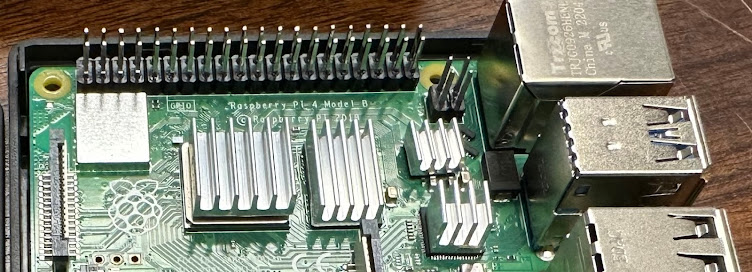
In the image above, pay attention to the area into which the USB port is plugged into the Raspberry Pi.

I powered on the whole mess of devices.  And...  Partial success!

Umbrel installed successfully

The Umbrel OS install worked.  However, the Raspberry Pi cannot see the hard drive.  That worried me, as I thought I had made an error in getting the kind that I did.  I did try the restart as suggested in the image above.  However, it came back to that same page.

(I haven't mentioned until now, but the Raspberry Pi has no monitor and no keyboard.  It is accessed with a web browser.  The window of the browser acts as the monitor for the Raspberry Pi.  The keyboard is just your computer's keyboard.)

I then tried two things at the same time.  One, I shut down all the components with the intent of starting up the hard drive first, then the Raspberry Pi.  Two, I noticed that the USB plug-in from the drive to the Raspberry Pi was blue.  I don't know if that's important, but I noticed that the Raspberry Pi's receiving, female ports were two black and two blue.

Click to expand and view labels better

I'm not sure which was the key to making it all work, but I believe that it was the USB port.  (***Edited on 10/3/23 to add, "Yes, checking Umbrel's forums, any drive needs to be connected to the blue USB ports.***)  With that change, I powered it up and was greeted with the following:

Finally, I could download the Bitcoin Node and the Lightning Node apps.  I can't get into the Lightning Node app until the Bitcoin Node finishes synchronizing.  That could take days.


I'll leave things there for the moment.  Once it finishes syncing the Bitcoin chain/node, I can dig into the Lightning node more.