Featured Post

Showing posts with label assembling. Show all posts

Monday, October 2, 2023

Making the Node: Assembling the Raspberry Pi and Finishing Set-up

With the drive done, I looked at the Raspberry Pi and the many parts included in the case I bought for it.  If you buy only a Raspberry Pi, below is what you receive.

Raspberry Pi 4 unboxed

The case comes with more than just a case.  There are heat sinks, the case, a fan, screws for it all, and some rubber feet.  The larger part of the case at the top-right of the image below separates into two smaller pieces so that the Raspberry Pi can fit inside.  The heat sinks are the four small pieces by the handle of the screwdriver.  One is upside-down (blue side up) to show that they came with adhesive backing.

Parts of the case

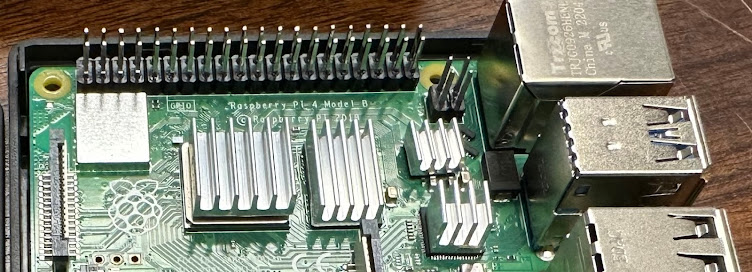
Below is an image of the Raspberry Pi with the aluminum heat syncs attached.  They are the four, finned, flat grey structures in the center.  I put all the fins in the same direction in the hopes that it would help dissipate heat (and that's what the image on the box showed).

Heat sinks attached

Next was getting the fan screwed into the ceiling of the case and plugging it into the correct pins (power, ground, and on-off toggle).

Fan screwed into the ceiling of the case

In the picture above, the fan will blow at you, and that will eventually be down into the case.

The fan will close down onto the components

Next, the fan is attached to the three pegs needed for it to function.  Then, it is seated into the main body of the case.  Lastly, that all comes down over the top of the circuitry to create a completed Raspberry Pi and case.

Cords attached and case ready to be closed up

Next two pictures are:  the bottom of the case after I attached the rubber feet, and the completed case with a 12-ounce can for comparison.

Rubber, shock-absorbing feet
Raspberry Pi is assembled!
Hmm...  Leftover screws 
The completed set-up is below.
Click to expand and view labels

Making the Node: Assembling the Raspberry Pi's Drive

I have all the parts that I ordered (and a few cables and items from my own supply) to make the Lightning Network Node on a Raspberry Pi.  See this blog post for background and a YouTube video link and some links to what I found on Amazon that would complete the computer that I'll be making.

The main purchase was this Raspberry Pi kit suggested by a video I watched.

Raspberry Pi's box top
Side panel w/ features

The other parts include an internal disk drive and its case.  The two together are generally cheaper than buying an external drive that needs no assembly.  Once the drive is in the case, it will function like an external drive for the Raspberry Pi (which has no hard drive of its own, I believe).

The case and components
The drive

This was easy to assemble.  There is little room for error; things fit together only in one way.

Case, opened, on left; drive on right
Drive plugged into case's circuitry

The drive plugs into an insert/board.  It seemed snug, but there are screws included in the kit that can be used to further secure the two together.

Underside of the assembled case + disk
Close-up of empty screw holes

I put in the four screws, assembled the whole thing, and I was done with the hard drive.  The device below will plug into the Raspberry Pi to be it "hard drive."  The main thing stored on it will be the full Bitcoin node--a full copy of all the transactions that have ever happened on the Bitcoin network.  That is necessary for the Lightning node to function.

Assembled drive

Overall, that was not too difficult.  On the videos I watched, I saw that their drives were powered by the Raspberry Pi's port and not an external power cord (like I have above).  I hoped it would not matter.  If it worked, and I just needed another open outlet for it...  Fine by me.